
1. What is an RFI?
RFIs (Requests for Information) allow you to get in touch directly with QuoIntelligence's team.
There are two types of RFIs:
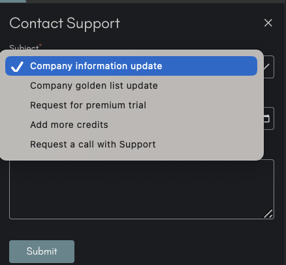
- Requests for Support: allow you to contact your Customer Success Manager. You can use Requests for Support to Update your Golden Source List, your Company Information or get in touch in case you encounter issues with Mercury, your Intelligence Platform.
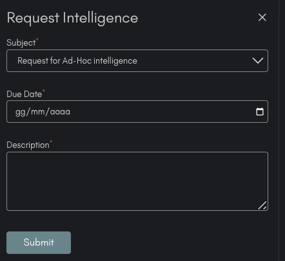
- Requests for Intelligence: allow you to get in touch with our Analysts. Open a Request for Intelligence if you want a Call with an Analyst, would like to more information on some intelligence found in Mercury or would like to use your Service Credits for a Report, Malware Analysis or any other Add-On Service.
2. How do I request an RFI?
There are two ways to request an RFI: via email or via Mercury, your Threat Intelligence Platform.
2.1 Requesting an RFI via email
There are two different email addresses you can write two according to the type of RFI your would like to submit:
- Requests for Support: for this type of request you can contact support@quointelligence.eu.
- Requests for Intelligence: to get in touch with our Analyst Team you can write directly at intel@quointelligence.eu. Please remember to always specify:
- The type of intelligence you are requesting (Malware Analysis, Bulletin, Report...).
- A deadline for your request
- Any other file useful information to better scope your request.
Once the email reaches our Team, we will reply to you acknowledging reception. Please note that currently we have an acknowledgment SLA of 24h, Monday to Friday.
2.2 Requesting an RFI via Mercury
The easiest way to request an RFI is by logging into Mercury, Your Threat Intelligence Platform at mercury.quointelligence.eu
Once logged in, you will be located in the main page of Mercury, where you can simply click to the icons on the top right to submit your RFIs:
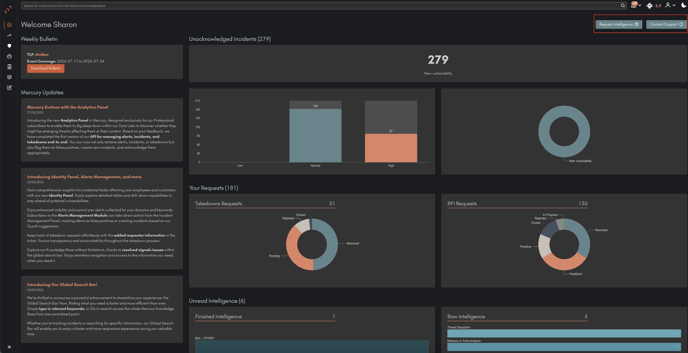
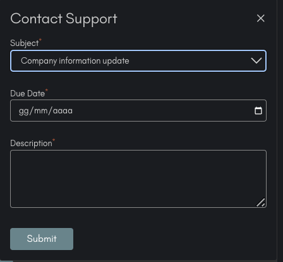
- Requests for Support: click on the button "Contact Support". A drop down menu will appear, which will allow you to select the most appropriate option for your Request, set a Deadline and write your Message. Once done, simply click on "Submit" and voilà, your Request is sent to our Support team.
 .
. 
- Requests for Intelligence: similarly, to request intelligence click on the button "Request Intelligence". A drop down menu will appear, which will allow you to select the most appropriate option for your Request, set a Deadline and write your Message. Once done, simply click on "Submit" to send your Request to our Analyst team.
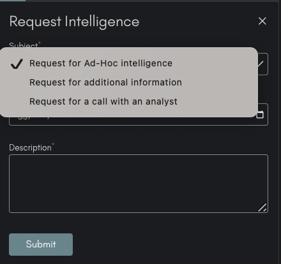
⚠️ N.B: Requests for Intelligence such as Reports, Malware Analysis or Call with Analysts will translate into Add on services, which will be charged via your Service Credits. Once the scope of the RFI is defined your Customer Success Manager will confirm with you the pricing and then launch the RFI.
Pricing of the QuoIntelligence's customized and ad-hoc Intelligence products is estimated based on the time, effort and resource employed and it is always agreed with the customer beforehand. For estimates, you can refer to our Intelligence Products RFI Catalog.